Live streaming can be more than a hobby. Stream to earn describes a concrete model: you broadcast live, your audience sends gifts, buys products, or subscribes, and eligible creators receive income. TikTok Live is one channel for this model, especially for gaming and interactive content where viewers can influence what happens on screen. You do not need millions of followers to get started, although access to LIVE and monetization depends on your account and region.
Interactive games give viewers more ways to participate during TikTok Live, and tools like BeetGames exist to connect that interaction to gameplay. BeetGames is a Windows-based app that maps supported TikTok gifts to in-game effects, letting your audience spawn enemies, trigger challenges, and control chaos in real time. The goal: more active participation, memorable live moments, and a stream-to-earn setup you can improve over time. Earnings are not guaranteed.
Download BeetGames Launcher or explore interactive games. The Launcher download is free; a free account can access the current weekly free game. Pro unlocks the active game library while subscribed.
Platform Basics: How Stream-to-Earn Works on TikTok Live
TikTok Live monetization involves several distinct steps. Viewers buy Coins with real money inside the app or through supported official channels. They spend those Coins to send virtual gifts during your live sessions. Eligible creators collect Diamonds, which TikTok considers when determining rewards under its applicable program rules. A gift's Coin price does not establish a guaranteed cash payout: check your own TikTok balance and withdrawal screen for the actual amount, limits, and available payment methods.
Our TikTok Coins price guide explains viewer purchase costs. For creator income, see how TikTok LIVE gifts pay creators and TikTok's Virtual Items Policy for your region.
Eligibility rules to know before you go live:
- You must be at least 18 years old to go LIVE.
- Sending or receiving LIVE Gifts requires being at least 18, or 19 in South Korea.
- You must meet TikTok's local follower requirement; LIVE availability and thresholds can vary by region.
- Your account must meet the applicable eligibility and account-standing requirements for each monetization feature.
- TikTok Live does not provide a universal payment per viewer; income opportunities include live gifts, TikTok Shop sales, subscriptions, brand sponsorships, and external tips where available.
Check TikTok's current LIVE requirements before planning your first session. Real-time audience engagement matters: a smaller audience that participates regularly can be more useful than a larger audience that immediately leaves.
Core Revenue Streams: Ways Live Streamers Actually Earn Money
Creators who earn money consistently from live streaming can combine several income sources. Relying on gifts alone makes revenue volatile. Ways to earn money through online streaming include direct fan support, subscriptions, affiliate products, ad revenue sharing on eligible platforms, and brand sponsorships. Here is how the main options fit TikTok Live.
- Live gifts and donations: Viewers can send virtual gifts during eligible TikTok Live sessions. Creator rewards depend on TikTok's current rules and the account's available balance. External tipping services offer a separate way for viewers to provide financial support.
- Subscriptions: Monthly subscriptions can offer exclusive perks for fans, such as badges, emotes, and subscriber-only experiences. Where available, this creates recurring revenue that does not depend entirely on gift spikes.
- TikTok Shop: Eligible creators can promote products during live sessions. You demonstrate items, answer questions, and let viewers buy through the available shopping features. Availability and access requirements vary by market.
- Brand sponsorships: Brand sponsorships pay creators to promote products through live demos, discount codes, and product demonstrations with pre-agreed talking points. An engaged niche audience can make these collaborations valuable.
- Affiliate products: Affiliate marketing lets creators earn commissions on qualifying sales through affiliate links or catalogs. Eligibility, disclosure requirements, and commissions depend on the program.
- External tips: Services such as PayPal or Patreon can provide additional fan-support options. They have their own fees and requirements, and may require viewers to leave the streaming platform.
Selling digital products or services can also be an income source. Some platforms share advertising revenue after creators meet specific milestones; content licensing can provide income from repurposed material. Diversifying revenue streams helps reduce dependency on one platform or income source.
For example, a gaming creator might blend BeetGames-driven interactive play with merchandise, affiliate gaming peripherals, and monthly subscribers. A cooking creator could build recipe challenges around audience participation, sell branded aprons, and link affiliate kitchen tools. These are possible formats, not earnings forecasts.
Interactive Gaming & BeetGames: Turning Gifts into Gameplay
Interactive gaming is a stream-to-earn format where viewers can affect gameplay in real time. When a mapped gift triggers a visible on-screen effect, the connection between audience participation and entertainment becomes easy to understand. Viewers can trigger in-game events with TikTok gifts, while supported comments, likes, and follows can add other ways to participate.
BeetGames offers a library of interactive games. The Windows launcher connects to TikTok Live, and you map supported events to the selected game's effects. Save your gift-to-effect mappings as presets so you can reuse the setup before your next broadcast. Available effects and trigger options depend on the game and current account access.
Here are concrete scenarios for an interactive live session:
- Chaos escalation: In a survival game, map a small gift to a supported enemy effect and a stronger gift to a larger disruption. Each tier should produce a visible, clearly explained action.
- Challenge unlocks: Where the game supports it, use a likes threshold to trigger a shared action. Viewers can work toward a goal together without sending a gift.
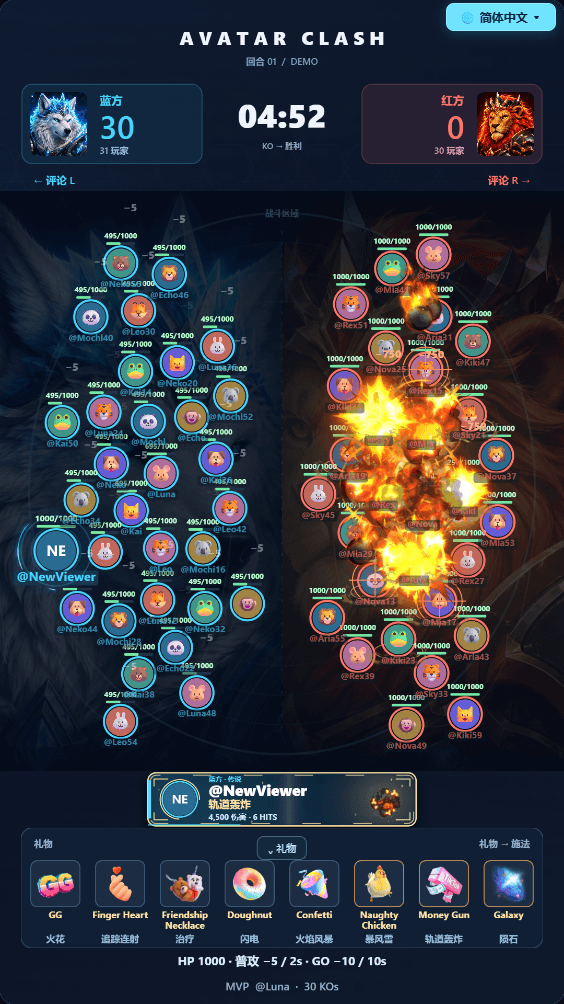
- Chat vs. streamer: Supported comment commands let viewers join teams or influence the action. Avatar Clash, for example, lets viewers join the Blue or Red side through chat.
- Survival pressure: In a challenge game, mapped effects can help the streamer or disrupt progress. Keep rounds playable between gifts so the audience always has something to watch.
For another format, Tower Fight lets viewers build, steal, freeze, and destroy towers, while Cozy Pup uses gift-triggered puppy reactions for calmer streams. Choose a game that fits the kind of show you want to host, then review its actual supported effects.
Use the gift effects guide to plan clear reactions and the gift-to-game setup guide to configure and test your mappings. Show the active rules in your stream overlay so viewers know what each event does.
Setting Up Your First Stream-to-Earn Session on TikTok Live
First things to check before going live:
- Confirm that your account has LIVE access and check whether LIVE Gifts are available.
- Verify that you meet the age and account requirements for the features you plan to use.
- Test your internet upload connection using your intended resolution and bitrate.
- Run a local test of the game, microphone, capture source, and gift effects before the broadcast.
Equipment basics:
- A Windows PC capable of running the selected game and broadcasting software.
- A ring light or natural light if you use a webcam.
- A tripod or stable mount for your camera.
- A microphone for clear commentary and a background free of distractions.
To add BeetGames to your setup, install the launcher on your Windows PC. Log in, select an available game from the library, and map three to five gift triggers. A block-building challenge can provide a clear goal for viewers to follow. Check each game's requirements: titles using Minecraft or Roblox may require a separate client.
Use simulated events to check that every mapping produces the intended action. Open TikTok Live Studio or OBS, capture the game window as a source, and add your microphone, webcam, and overlay as needed. Connect your LIVE room and verify the event feed when you begin broadcasting.
For your first stream, try the format “Gifts Control My Game.” Display an overlay explaining what each gift does. Title your live session clearly and describe the actual mappings you configured. Speak the rules out loud and repeat them as new viewers arrive so they know how to interact immediately.
Maximizing Audience Engagement During Live Sessions
Stream-to-earn performance depends on how viewers interact, not just how many show up. Track participation and retention alongside revenue. Longer sessions may create more opportunities for interaction, but simply staying live longer does not guarantee higher earnings.
Tactics you can try in your next broadcast:
- Run mini-games, polls, or “chat chooses my next move” segments between interactive gameplay rounds.
- Call participants by name, thank gift senders, and acknowledge helpful comments as well as gifts.
- Set a clear round goal: “Can we finish this tower before the three-minute timer ends?”
- Explain each visible gift reaction so new viewers understand the connection.
- Try relevant TikTok challenges as themes for your interactive segments.
- Keep the rules visible through pinned comments or overlay graphics explaining gift effects.
Platforms like Twitch and YouTube also provide monetization tools for eligible creators. On TikTok Live, co-hosting can introduce your stream to another creator's audience. Choose a collaborator with a compatible format, explain the interaction rules, and measure whether viewers stay and participate.
Monetizing Beyond Gifts: Shop, Merch, and Affiliate Products
Creators can layer social selling on top of gifts to diversify revenue. Choose products that make sense for your audience and the stream you are hosting.
- TikTok Shop: Where your account is eligible, feature products during your live session, demonstrate them, and answer questions. Make any pricing and promotional terms clear.
- Own merchandise: Sell hoodies, caps, or mouse pads branded with your logo or catchphrases. Print-on-demand services can reduce the need to hold inventory, although costs, returns, and margins still matter.
- Affiliate products: Link gaming peripherals, microphones, or ring lights you actually use. Explain the affiliate relationship and follow the program's requirements.
A stream might blend a BeetGames interactive session with a merchandise mention and an affiliate product demonstration when you adjust your microphone. Keep these moments relevant so gameplay and conversation remain enjoyable for viewers who do not buy anything.
Promoting Your Stream-to-Earn Content Across Other Social Media Platforms
Relying only on TikTok's algorithm makes discovery unpredictable. Cross-promotion on other social media platforms gives your audience more ways to find your next live session.
- Clip your best live moments—gift reactions, enemy spawns, or chat chaos—and post them as Instagram Reels and YouTube Shorts with a route to your TikTok profile.
- Post your weekly live streaming schedule on Instagram Stories, YouTube Community posts, and your Discord server.
- Repurpose streams into highlight clips that explain the game and invite viewers to join the next round.
- Build an opt-in email list or Discord community to announce themed events and new game sessions.
- Stream simultaneously to other platforms where your setup and platform terms allow it, explaining which audience actions the game supports.
- Share relevant demonstrations in niche communities when their rules allow promotion, and participate in the discussion.
Try three or four of these actions per week and track which channel brings new viewers who actually participate in your live sessions.
Best Practices, Earnings Benchmarks, and Long-Term Strategy
Realistic earnings benchmarks start with your own broadcasts. Follower count alone does not predict income: audience location, repeat supporters, content, session length, and available monetization features all affect results. Some live sessions receive no gifts, and software access does not guarantee earnings.
For outside context, TikMonitor publishes statistics from the public live sessions it tracks. Its sample consists of creators its users chose to monitor, rather than a random sample of TikTok. Treat those observations as context, not a forecast for a new channel or proof that a longer stream causes higher income.
What to track with your analytics:
- Average watch time per viewer and how it changes during interactive segments.
- Comments, likes, and gifts during each game format.
- The actual creator rewards shown in TikTok after processing, alongside your software and other operating costs.
- Click-through rate and qualifying sales from TikTok Shop items or affiliate products.
- Follower growth and returning viewers to decide which themes and challenges are worth repeating.
Choose a consistent schedule you can sustain. BeetGames helps you reuse supported gift mappings and test events before each new stream. As you learn what your audience enjoys, add new game triggers, themed events, or different game formats. Change one part of your setup at a time so you can understand the result.
Keep records of income, fees, and expenses, and check the tax requirements that apply to you. Understand platform pricing and account-specific payout rules before treating any estimate as cash you can withdraw.
A practical stream-to-earn strategy combines interactive gaming, relevant income sources, and consistent promotion, then improves using real session data.
Start this week: pick one available BeetGames game, set up three to five supported gift triggers, test them, and host a session. Record what viewers enjoyed and the results shown in your dashboard. By the end of the month, you will have your own data to decide what to improve.
Download the free Windows Launcher and choose your first interactive game. Review the current free availability and Pro access before selecting a game.